The Real Cost of Tranche 2 Isn’t Screening, It’s the Admin Around It
Most agencies preparing for 1 July 2026 assume the hard part will be sanctions screening or risk assessment. In practice, the single largest time drain is far more mundane: re-keying client details from emails, chasing incomplete buyer and seller files, and transcribing handwritten forms into a compliance system.
Think about a typical residential sale. Two sellers, a company buyer with three beneficial owners. That’s six individuals who each need to provide their full legal name, date of birth, residential address, contact details, citizenship, source of funds declaration, and consent acknowledgements. Manually transcribing that information is error-prone, slow, and creates a compliance risk every time an officer mistypes a digit or transposes a name.
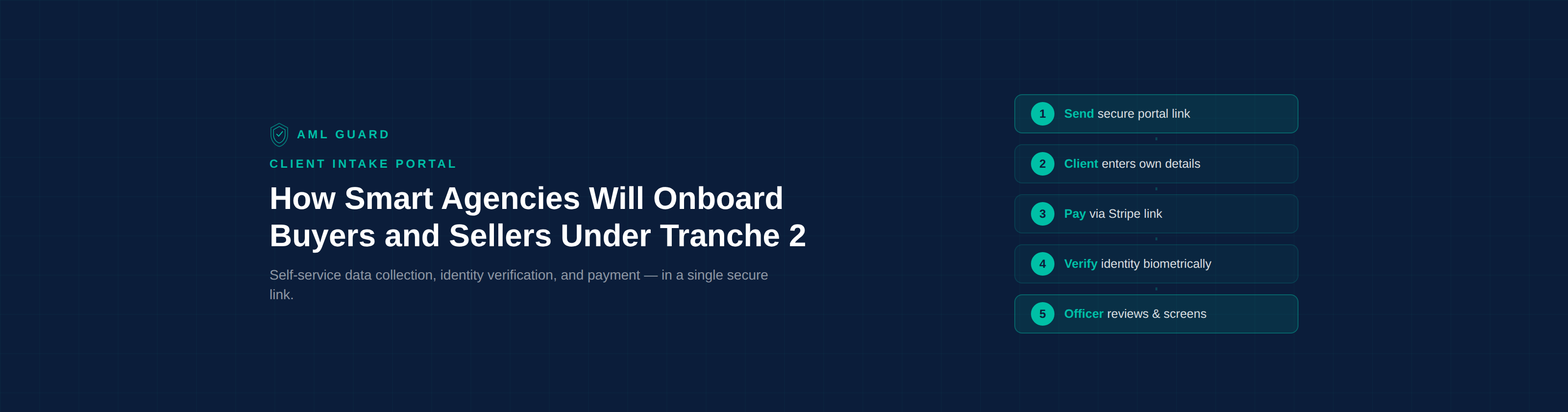
AML Guard’s Client Intake Portal eliminates this bottleneck. Instead of the compliance officer re-keying client data, the client enters their own information through a secure, time-limited web link, then proceeds through payment and identity verification in a single continuous flow. In the standard flow, by the time the officer opens the case, the data is already there, identity-verification steps are complete, and the case is ready for screening and risk assessment.
AML Guard does not replace compliance judgement. It standardises intake so your officers spend time on screening, risk and escalation decisions instead of re-keying data and chasing documents.
This article explains how the portal works from both the client’s and the agent’s perspective, why self-service data collection is a lawful operating model under the AML/CTF framework, and how the system protects against tipping-off risks at every step.
How the Client Intake Portal Works
The portal supports two modes and two flows, designed to fit the way real estate agencies actually operate.
Remote Mode: Send a Secure Link
This is the default for most transactions. The compliance officer creates a new CDD case in AML Guard, selects the service type and relationship classification, and clicks “Generate Client Portal Link.” The system generates a unique, time-limited, cryptographically random URL and the officer sends it to the client via email, SMS, or by copying the link directly.
The client opens the link on their phone or computer: no app download, no account creation, no login. They see a branded intake form with their agency’s name and are guided through each section: personal details, contact information, residential address, citizenship and country of birth, source of funds declaration, and consent acknowledgements.
On submission, the system automatically sends the client a payment link via Stripe. Once payment is confirmed, an identity verification link is sent to the same contact method. The client completes biometric identity verification: a face match against a government-issued identity document: on their own device, at their own pace.
In many cases, clients can complete the entire process: data entry, payment, and identity verification: in minutes, in a single session on their phone.
Timing and sequencing: The portal’s workflow timing is configurable to align with designated-service timing and any applicable delayed initial CDD scenarios permitted under the AML/CTF Rules. Where the law requires earlier action: for example, sanctions screening that cannot be deferred: the compliance officer can initiate screening at any point, independent of whether the client has completed payment or identity verification.
Supervised Tablet Mode: In-Person at the Listing Appointment
For listing appointments, open-for-inspections, and conveyancing intake meetings, AML Guard offers a supervised tablet mode. Instead of sending a link remotely, the officer opens the portal on an agency-provided tablet in single-session kiosk mode. The client enters their own data on the tablet while the agent is present.
After submission, the tablet displays a handoff screen: “Send next steps to my phone” or “Scan this QR code to continue on my device.” Payment and identity verification then continue on the client’s own personal device. The tablet session clears completely: all entered data is removed from browser memory, session storage, and form cache. The back button is suppressed. The next client sees a clean, neutral start screen.
This design is deliberate. Tablet mode is for timeboxed data entry only. Payment and biometric verification default to the client’s own device to minimise shared-device privacy exposure and reduce the risk of one client inadvertently seeing another’s information.
High-Volume Intake: Client-First Flow
For agencies processing a high volume of transactions, AML Guard supports a client-first flow. An agent generates a generic intake link with a lightweight context tag (Sale, Purchase, Conveyancing, or Other) and sends it to the client before a CDD case exists. The client completes the portal. The submission lands in an intake queue where the compliance officer reviews it, creates the case with the correct compliance classifications, and initiates the downstream verification chain.
This flow is ideal for agencies where the sales team interacts with clients first and the compliance function follows. The compliance officer retains full control over all classification and assessment decisions regardless of which flow is used.
What Information Does the Client Provide?
The portal collects the biographical and declaratory information needed for Customer Due Diligence. The compliance officer configures a Collection Profile at the tenant level that determines which fields appear for each onboarding pathway. Clients within a given pathway see a standardised experience that does not vary based on screening outcomes or internal suspicion.
For an individual, the standard collection includes: full legal name, date of birth, email address, mobile phone number, residential address, citizenship and country of birth, self-selected role (buyer, seller, beneficial owner, or other), source of funds category and narrative description, source of wealth narrative (if required by Collection Profile), property address (if known), and privacy acknowledgement, accuracy declaration, and consent to identity verification.
Crucially, the portal never exposes compliance information to the client. No screening results, risk scores, case status, officer notes, or suspicious matter indicators are ever visible. The portal can collect data and initiate identity-verification steps, but compliance assessment, screening disposition, risk rating, and approval remain with the reporting entity. This is a strict one-way data collection and verification-initiation instrument: information flows from the client into the platform. Nothing flows back.
Companies, Trusts, and Beneficial Owners
When a buyer or seller is a company, trust, or SMSF, AML Guard uses a two-stage cascade to collect information from every person who needs to be verified.
Stage 1, Entity contact person. The company director, trustee, or authorised representative completes the portal form. In addition to their personal details, they provide entity details (company name, ACN/ABN, trust type) and nominate the beneficial owners, the individuals who ultimately own or control the entity.
Stage 2, Beneficial owners. On submission, the system automatically generates individual portal links for each nominated beneficial owner. Each BO receives their own unique, private link and completes their own personal details, source of funds declaration, and identity verification independently. No beneficial owner can see another person’s data. Each link creates a linked CDD case within AML Guard.
Complex companies, trusts, SMSFs, and layered ownership structures may still require officer review of trust deeds, control chains, settlor and beneficiary identification, and supporting source-of-funds or source-of-wealth evidence beyond what the portal collects. The portal handles the intake; the compliance officer handles the analysis. That distinction is where workflow automation ends and compliance judgement begins.
Payment responsibility is flexible. By default, each beneficial owner pays individually via their own Stripe link. Alternatively, the entity contact person can pay for all beneficial owners in a single transaction. Or the agency can absorb the cost entirely. The compliance officer configures this per-case.
This cascading flow means that for a company with three beneficial owners, the compliance officer generates one portal link. The system does the rest: creating individual cases, sending individual links, collecting individual verification, and linking everything back to the parent entity case automatically.
Is Self-Service Data Collection a Lawful Operating Model?
The AML/CTF framework prescribes what must be collected and verified for Customer Due Diligence. It does not prescribe that information must be handwritten, emailed, or keyed by staff. A secure self-service portal is therefore a lawful operating model, provided the reporting entity still conducts and controls the required CDD, screening, risk assessment, and record keeping.
A client entering their own details through a secure web form is functionally equivalent to a client completing a paper identification form at a solicitor’s office or a real estate agency’s front desk. The data is the same. The declaration is the same. The only difference is that the digital version is timestamped, auditable, and doesn’t require an officer to re-key it.
The reporting entity’s obligation is to verify, assess, and retain, not to transcribe. The compliance officer retains exclusive control over all compliance decisions: service type classification, relationship classification, risk assessment, enhanced CDD triggers, screening match disposition, suspicious matter identification, and case approval. The portal collects data and initiates identity-verification steps. It does not perform compliance assessment.
This distinction matters. Some agencies worry that letting the client enter their own data somehow dilutes the officer’s oversight. It doesn’t. The officer reviews every piece of submitted data, runs every screen, makes every compliance decision. The portal simply eliminates the manual transcription step that adds no compliance value and introduces transcription errors.
Tipping-Off Protection: How the Portal Stays Safe Under Section 123
Section 123 of the AML/CTF Act 2006 makes it a criminal offence to disclose that a suspicious matter report has been or will be made, or that information has been communicated to AUSTRAC. For any client-facing system, this creates a critical design constraint: the system must never leak any information that could indicate a compliance concern.
AML Guard’s Client Intake Portal enforces this through uniform treatment at every layer:
Standardised experience, not varied by suspicion. Clients within a given onboarding pathway see the same portal form, the same wording, the same payment request, and the same identity verification link. The experience does not vary based on risk score, screening results, or enhanced CDD triggers. A client flagged as a politically exposed person receives the same communications, in the same timeframe, as a client with no flags.
No compliance information exposed. The portal never displays case status, screening results, risk assessments, officer notes, or any indication that an SMR is being considered. After submission, the client sees a single generic confirmation: “Thank you. Your information has been received. [Agency Name] will send any required next steps shortly.” Nothing more.
Standardised timing. Payment reminders, identity verification links, and any follow-up communications use standardised timing bands and approved templates. A client whose case is under enhanced scrutiny receives their follow-up at the same interval as every other client. Timing variation cannot become an observable compliance signal.
Approved communication vocabulary. All outbound communications use pre-approved, neutral language. Follow-up requests for additional information use standardised templates that are identical regardless of the reason for the request. An officer requesting clarification on source of funds uses the same template wording whether the request is routine or triggered by a screening match.
This uniform-treatment model materially reduces the risk of inadvertent tipping off by removing observable differences in the client experience. Even if a client were to compare their experience with another client’s, they would find no meaningful variation.
What the Compliance Officer Sees
While the client’s experience is simple and streamlined, the officer’s view is where the compliance depth sits.
When a client submits their portal data, the case transitions to a pending review state. The officer opens the case and sees the complete submission: all personal details, all declarations, source of funds narrative, contact preferences, submission timestamp, entry mode (remote or tablet), and the audit trail of consent acknowledgements.
A Declaration Confidence Panel surfaces potential issues for the officer’s attention: incomplete source of funds narratives, vague descriptions, third-party payer indicators, high-risk jurisdiction flags, value inconsistencies between declared income and transaction value, and mismatches between portal-submitted data and identity-verified data. These flags are internal only, the client never sees them.
The officer then initiates screening against global sanctions, PEP, and adverse-media datasets. The risk scoring engine applies a multi-factor assessment across AUSTRAC-aligned risk categories. If enhanced CDD is triggered, the officer manages it through the platform’s guided workflow. If a suspicious matter report is required, the officer prepares and lodges it through AML Guard’s AUSTRAC reporting workflow.
Every intake step, declaration, payment event, verification result, and officer action is timestamped and recorded in a complete audit trail. When AUSTRAC asks how you conducted CDD on a particular client, the answer is already documented.
At no point does any of this compliance activity flow back to the client through the portal or any other channel. The separation is absolute.
Customer-Pays: How Payment Fits Into the Flow
AML Guard uses a customer-pays model. The buyer or seller pays for their own compliance verification, much like paying for a conveyancing search or a building inspection. The payment is collected via Stripe between the data submission step and the identity verification step, so the client experiences a single continuous flow: enter details, pay, verify identity.
Who bears the cost is a commercial choice for the agency, not a compliance requirement. AML Guard supports customer-pays, agency-pays, or hybrid models. In the customer-pays model, every customer-paid verification earns a credit against the monthly subscription, which can materially offset platform cost for active agencies.
If the agency needs to proceed before customer payment clears, the compliance officer can override the payment gate and continue the workflow. The agency’s card on file is charged immediately, and if the customer subsequently pays, the agency receives an automatic credit. The client experience is unchanged. The override is visible only to compliance-authorised roles.
Security and Privacy by Design
The portal is built on the same AWS infrastructure as the rest of AML Guard: encrypted at rest with KMS, encrypted in transit with TLS, role-based access controls, and full audit trails on every action.
Each portal link is a unique, cryptographically random token with a configurable expiry. There is no login, no account, and no way for one client to access another client’s data. Tokens are single-use per submission. Abandoned or partial sessions are automatically purged. IP addresses and device information are captured only for submission and consent events, not routine page views, consistent with data minimisation principles under the Australian Privacy Principles. Records are generally retained for at least 7 years in line with AML/CTF record-keeping obligations.
In supervised tablet mode, session data is cleared on submission, cancellation, revocation, timeout, or manual agent reset. No client data persists on the device between sessions.
Frequently Asked Questions
Can my client complete their own AML intake and identity verification?
Clients can self-complete data entry and identity-verification steps through a secure portal workflow. The AML/CTF framework prescribes what information must be collected and verified, not that it must be keyed by staff. However, the reporting entity still performs and controls the compliance assessment: screening, risk scoring, enhanced CDD, suspicious matter identification, and case approval all remain with your compliance officer. The client self-serves on intake; the officer retains full control over compliance decisions.
What information do real estate agents need to collect for AML compliance?
Under the AML/CTF Act and Rules, you must collect sufficient information to verify your client’s identity and assess their money laundering and terrorism financing risk. For individuals, this typically includes full legal name, date of birth, residential address, citizenship, and identity document details. You also need to understand the source of funds for the transaction. For companies, trusts, and SMSFs, you must additionally identify and verify beneficial owners, the individuals who ultimately own or control the entity. Records must generally be retained for at least 7 years in line with AML/CTF record-keeping obligations.
Can I use a tablet for AML client onboarding at a listing appointment?
Yes. AML Guard’s supervised tablet mode is designed specifically for listing appointments and in-person intake meetings. The client enters their data on an agency-provided tablet, and after submission, payment and identity verification continue on the client’s own personal device via a secure link or QR code. The tablet session clears completely between clients. This gives you the efficiency of immediate data capture without the privacy risks of shared-device identity verification.
Who pays for AML identity verification, the agent or the client?
Who bears the cost is a commercial choice for the agency, not a compliance requirement. With AML Guard’s customer-pays model, the buyer or seller pays for their own compliance verification via a secure Stripe payment link, similar to how clients pay for conveyancing searches or building inspections. Every customer-paid check earns a credit against your monthly subscription. AML Guard also supports agency-pays and hybrid models.
Does sending a client an AML portal link create a tipping-off risk?
AML Guard’s portal uses uniform treatment: clients within a given onboarding pathway receive the same form, the same wording, the same payment request, and the same identity verification link. The experience does not vary based on risk profile or screening results. No compliance information is ever visible to the client. Communications use standardised timing and approved templates. This materially reduces the risk of inadvertent tipping off under section 123 of the AML/CTF Act by removing observable differences in the client experience.
How does AML identity verification work for companies and trusts?
AML Guard uses a two-stage cascade. First, the entity contact person, typically a company director or trustee, completes the portal with their personal details plus the entity information and beneficial owner nominations. The system then automatically generates individual, private portal links for each nominated beneficial owner. Each beneficial owner completes their own data entry, payment, and identity verification independently. Complex structures may still require officer review of supporting documents such as trust deeds and source-of-funds evidence.
What happens if a client doesn’t complete their AML checks?
Portal links have a configurable expiry period. If a client hasn’t completed their submission within the timeframe, the officer can resend the link or generate a new one. AML Guard uses standardised reminder templates with uniform timing. If the agency needs to proceed before the client completes identity verification, the compliance officer can initiate screening using information already provided. Incomplete intake submissions with no associated case are automatically purged after 30 days.
AML Compliance Doesn’t Have to Mean More Admin.
The real test of any compliance tool is whether your team uses it consistently, correctly, and without workarounds. A system that requires the compliance officer to manually re-key every client’s details creates friction, introduces errors, and makes the officer’s day harder than it needs to be.
AML Guard’s Client Intake Portal removes the friction at the point where it matters most: the first interaction with the client. By the time the compliance officer opens a case, the client’s data is already entered, their identity verification is complete, and the case is ready for the work that actually requires compliance judgement: screening assessment, risk scoring, and decision-making.
The portal doesn’t just collect data. It structures the intake so every subsequent step starts from cleaner information, better auditability, and less admin overhead for your officer.
If Tranche 2 is going to land on your team, the question is whether your staff will spend that time on compliance judgement or admin.
Ready to see AML Guard in action?
Book a demo and see how the Client Intake Portal works for your agency.
Related Reading
When Does AML Compliance Actually Start in a Property Transaction?
What Is an AML/CTF Program? A Plain-English Guide for Property Professionals
AML/CTF Compliance Checklist for Real Estate Agents
Beneficial Ownership: How to Trace UBOs Under Tranche 2
This article is for general information purposes only and does not constitute legal advice. Firms should obtain independent professional advice on their specific AML/CTF obligations.
Last reviewed: April 2026.