
Microsoft 365-style collaboration tools can carry AML tasks, but they do not by themselves create an audit-ready system of record. Your workflow has to capture the decision, the reasoning behind it and a retained case file, not just the supporting documents. What follows is a practical set of patterns and a checklist for mapping intake, risk decisions, approvals, retention and holds onto the tools your team already uses.
TL;DR:
- Section 111 requires CDD records to include any analysis, risk assessment or decision-making about the customer, kept for seven years after the business relationship ends or the occasional transaction is completed.
- Require an explicit human approval gate that records the CDD level, rationale, approver, timestamp, and linked evidence before a case proceeds.
- Use one case ID across intake, verification results, risk scoring, notes, and approvals, then lock the final evidence copy while keeping drafts editable.
- When a suspicion arises, assemble the file and consider preserving the relevant mailboxes, shared sites and chat history, recording who did it and when.
- Confirm with your IT provider how long your tools keep records and audit logs; do not assume the defaults meet the periods the Act sets.
Table of Contents
- Why workflow design matters for AML casework
- Common Microsoft 365 patterns and where they break down
- Practical checklist: organising AML and CDD workflows
- Capturing decisions and evidence to meet section 111
- Retention, audit logs and preparing for an audit
- Governance, roles and procedures behind reliable workflows
- How compliance officers actually run this day to day
- Where AML Guard fits alongside your existing tools
- FAQ
- Sources
Why workflow design matters for AML casework
Regulators do not examine software. They examine records. AUSTRAC guidance asks reporting entities to keep the records reasonably necessary to demonstrate compliance with their obligations, and gives examples for program records, customer due diligence records and transaction records.
That expectation has a legal anchor. Under section 111 of the Anti-Money Laundering and Counter-Terrorism Financing Act 2006 (Cth), CDD records must include records of any analysis, identification or assessment of ML/TF risk, or decision-making, about the customer, and must be kept for seven years after the business relationship ends or the occasional transaction is completed. A folder full of passports and utility bills does not satisfy that requirement on its own: the file has to show why a decision was made, not only what was collected.
When a reviewer opens a case, the questions tend to follow a pattern:
- Who assessed this customer’s risk, and when?
- What reasoning supports the CDD level applied?
- Who approved the outcome, and is that approval recorded anywhere?
- Can you show the document that was actually relied on, not a later version?
AUSTRAC’s guidance gives examples of the records that help demonstrate compliance for each obligation, including senior manager approvals, meeting minutes, and for suspicious matter reporting, internal escalation records and notes showing review outcomes and the rationale for decisions. A workflow built around email and shared drives rarely produces those records as a natural by-product. It has to be designed to produce them.
Common Microsoft 365 patterns and where they break down
Most firms already run some version of this workflow: a case arrives, an email collects identity documents, a shared folder holds the file, and a chat thread carries the approval. Each step is a familiar tool doing an unfamiliar job.
- Email as a document pipe. Identity documents sent by email sit in inboxes with no access control tied to the case, no consistent naming and no guarantee the version attached is the one actually relied on.
- Shared folders and multiple copies. A driver’s licence gets re-uploaded after a better scan arrives, a risk memo gets edited twice, and nothing ties the final version back to the decision it supported.
- Untracked approvals. A compliance officer approves a determination in a Teams message or a verbal conversation, and that approval leaves no retrievable, attributable record.
- Logging and retention gaps. Default settings in most collaboration platforms do not automatically capture every event an auditor might ask about, and retention periods are often set for general business purposes rather than the seven-year minimum CDD records require.
None of these failure modes are about the tools being inadequate. They happen because the workflow was designed for getting work done, not for proving, months or years later, who decided what and why.
Pro Tip: Treat every CDD decision as a document in its own right: a short, dated, attributable decision record that sits inside the case file, separate from the evidence it relies on.
Practical checklist: organising AML and CDD workflows
Collaboration tools can support AML casework when the workflow around them is deliberately designed to produce a case file, not just a conversation thread. The pattern below works whether your firm uses Microsoft 365-style tools, another suite, or a mix, and it is worth confirming the specific configuration options available with your IT provider rather than assuming a default setup already covers these requirements.
1. Intake
- Create a single intake record per customer with mandatory fields (customer type, designated service, risk indicators) rather than relying on a free-text email.
- Avoid accepting identity documents by email where possible; use a secure upload point instead, and capture document metadata (type, issuer, expiry, date received) alongside the file.
- Record who received the document and when, so the intake record itself becomes part of the evidence trail.
2. Risk assessment
- Use a checklist-based scoring approach rather than an informal judgement call, so the inputs to the decision are visible.
- Require an explicit approval action, not a passive sign-off, that writes a short decision summary into the case file: what was assessed, what level of CDD was applied, and why.
- Separate the risk score itself from the narrative reasoning; both need to be retrievable later.
3. Task orchestration
- Assign tasks for chasing outstanding evidence with due dates, rather than leaving follow-up to memory or an unstructured inbox.
- Configure reminders for ongoing CDD reviews and re-screening triggers; a case that passed initial due diligence two years ago still needs a mechanism to flag when it is due for review.
- Keep task assignment visible to a second person, so coverage does not depend on one individual’s inbox.
4. Case assembly
- Use a single case ID that every document, note and approval references, rather than letting a customer’s file exist as a scattered set of folder locations.
- Link verification outputs, screening results and the decision summary to that case ID, not just the raw documents.
- Mark finalised evidentiary copies clearly and lock them from further editing once the decision is made; working drafts can stay editable, but the record that was relied on cannot.
5. Investigation holds
- When a suspicion is formed, assemble the case file at that point and preserve the relevant mailboxes and sites, rather than trying to reconstruct the file later from dispersed sources. Remember that the suspicious matter report itself is due within 3 business days of forming the suspicion (24 hours for terrorism financing).
- Scope the hold to the specific case, including the relevant mailboxes, shared sites and chat history, and document when the hold was applied and by whom.
- Treat the hold itself as a recorded event: a hold nobody can later prove existed is not much better than no hold at all.
Each of these steps is a configuration and process decision, not a feature claim. What matters is whether the resulting file, taken as a whole, shows the analysis and the decision, not merely the paperwork that supported it. Our guide to customer due diligence walks through the specific triggers for standard versus enhanced CDD if you need that detail before building the checklist out.
Capturing decisions and evidence to meet section 111
Section 111 does not ask for a vague sense that due diligence occurred. It asks for a record that shows the analysis and the decision. In practice, a case file that meets it will usually contain:
- A decision summary: a short, dated statement of what CDD level was applied and why.
- The risk score and its rationale: the inputs considered, not just the resulting number.
- The approver’s identity and timestamp: who signed off, and when.
- Linked document IDs and verification outputs: the specific evidence relied on, tied to the case, not floating in a general folder.
A workflow that stores the right documents but never writes down who decided what, and on what basis, falls short of what the legislation asks for even if every identity check was done properly. The Anti-Money Laundering and Counter-Terrorism Financing Act 2006 (Cth) is specific on this point: CDD records must include any analysis, risk assessment or decision-making about the customer, not merely the documents collected.
The practical fix is to build an approval gate into the workflow rather than treating approval as an informal nod. The gate should require the approver to record a brief rationale before the case can proceed, and that rationale, along with the approver’s identity and the date, becomes part of the retained case file. It is also worth separating working copies, which can be edited and re-versioned as a case develops, from the finalised evidentiary copy, which is locked once the decision is made.
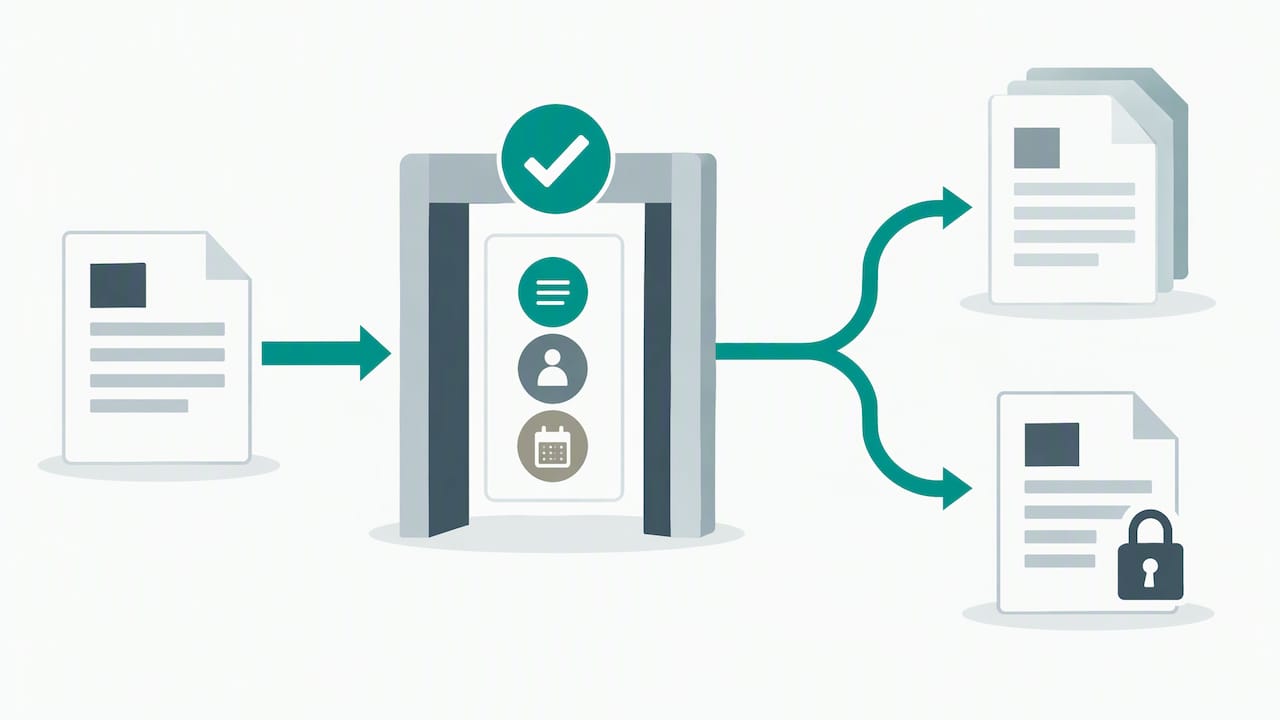
The human approver remains the essential part of this chain. A system can surface the information and prompt for a decision, but the judgement about whether a customer’s risk profile justifies standard or enhanced due diligence has to sit with a person who can be identified and held to that call.
Retention, audit logs and preparing for an audit
Retention and logging deserve their own dedicated treatment given how technical the detail gets for any specific platform, and we cover that in our article on AML record retention in Microsoft 365. The essentials worth knowing here:
- The statutory period for CDD records is seven years after the business relationship ends or the occasional transaction is completed, under section 111 of the Anti-Money Laundering and Counter-Terrorism Financing Act 2006 (Cth).
- How long your tools keep audit logs depends on their configuration and licensing, which your IT provider can confirm. Do not assume a default setting is already active.
- Audit events worth capturing include document uploads, approval actions, access to a case file and any change to a finalised record, each linked back to the case ID rather than sitting as an isolated log entry.
- Treat retention settings as something to document and verify periodically, not configure once and forget; a setting that was never switched on produces a gap that only becomes visible when someone asks for a record that no longer exists.
Confirm the specific retention and logging configuration available in your environment with your IT provider, since default settings vary and are not a substitute for a documented, verified policy. Our piece on the seven-year record-keeping clock goes further into how retention obligations interact with day-to-day casework.
Governance, roles and procedures behind reliable workflows
A workflow is only as reliable as the governance sitting around it. Reviewers will look for the AML/CTF compliance officer and, where relevant, senior management, formally assigned to approve program artefacts and individual determinations, with that assignment itself documented rather than assumed.
- Training records should show who completed what training and when, kept as evidence alongside the program documents rather than as a separate, disconnected list.
- Version control on policies, risk assessments and procedures matters: an auditor may ask which version was in force when a particular decision was made.
- Regular review cycles, and any independent evaluation of the program, should feed back into the program record, with outcomes and any resulting changes documented rather than left as a one-off exercise.
These artefacts are what turn a workflow from a set of helpful habits into something a supervisor can actually verify.
How compliance officers actually run this day to day
In practice, compliance teams accept a trade-off: more structure at intake in exchange for a case file that holds up months later. Many start with a pilot on one designated service, build a template for the decision summary and approval gate, and only roll it out further once the pattern proves workable.
The deeper shift is cultural rather than technical. Automation can chase documents, trigger reminders and assemble a file, but a person still has to look at a customer’s risk profile and make the call. Paperwork follows that decision, not the other way around.
Where AML Guard fits alongside your existing tools
We built AML Guard to be the compliance record sitting next to the collaboration tools your team already uses, not a replacement for them. Guided workflows walk an officer through each customer due diligence determination, and an officer approves each determination: the decision, the rationale and the approver’s identity are written to the case file at that point, not reconstructed afterwards.
Every step, from risk scoring through to the final approval, sits inside an 8-year tamper-evident audit trail, above the Act’s seven-year minimum. If your current setup relies on email threads and shared folders to get CDD done, that is a reasonable starting point for collaboration; what it usually lacks is a single, locked record of who decided what. You can see current plans on our pricing page or book a demo to see how the platform fits around the tools you already run.
FAQ
Will AI replace an AML analyst?
No credible evidence suggests AI replaces the judgement an AML analyst or compliance officer provides. Automation can gather documents, run screening checks and flag risk indicators, but a qualified person still needs to assess the result and approve the outcome, particularly where section 111 requires a recorded analysis behind the decision.
Does Microsoft have a workflow tool?
Microsoft 365-style suites include collaboration and task tools that can be configured to support workflows, including document storage, task assignment and approval chains. Confirm with your IT provider which specific tools and configurations are available in your environment, since this varies by licence and setup.
What are the four types of workflows?
Workflow categorisation varies by source and context; there is no single universal four-type standard in AML/CDD casework. Within this article, the useful split is intake, risk assessment, task orchestration and case assembly, each needing its own controls to produce an audit-ready file.
What are the AML and KYC processes?
AML (anti-money laundering) processes cover the broader program obligations a reporting entity runs, including risk assessment, customer due diligence, screening and suspicious matter reporting. KYC (know your customer) information is what customer due diligence collects and verifies; the Act uses both terms, and CDD also covers identifying the customer’s ML/TF risk.
How do I prepare a case file for an AUSTRAC request?
Assemble the case file around a single case ID linking the intake record, verification outputs, risk assessment and the approver’s decision summary, and apply a hold to relevant records as soon as a request or suspicion arises. Our guide to preparing for an AUSTRAC audit sets out the detail.
Sources
- Anti-Money Laundering and Counter-Terrorism Financing Act 2006 (Cth)
- Record keeping overview | AUSTRAC
Recommended
- AML record retention in Microsoft 365
- Digital AML onboarding: six steps, one decision
- KYC document capture that holds up under audit
- Liveness detection for Australian AML checks
See How AML Guard Works
Tranche 2 obligations are now in force.
Book a 20-minute demo to see how AML Guard supports your compliance from the moment your designated service begins.