
A compliance status in your CRM should be one short, neutral word that tells sales staff whether a customer file can move forward: not started, in progress, cleared or on hold. The decision behind that word, and the reasons for it, belong in your compliance system, where access is limited to the AML/CTF compliance officer and the people who need the detail. The CRM displays the outcome. It never sets it, and it never hints at suspicion.
Since 1 July 2026, real estate agencies, conveyancers, law firms, accounting practices and trust and company service providers have been reporting entities under the Anti-Money Laundering and Counter-Terrorism Financing Act 2006 (Cth) when they provide the newly regulated designated services. Most of them already run a CRM, and most have put some kind of compliance field in it. This article sets out what that field should contain, who should control it and which words should never appear in it.
TL;DR
- Use a small, neutral status vocabulary in the CRM: not started, in progress, cleared, on hold. Nothing else.
- Only the officer moves a file to cleared. The CRM shows the result and never sets it.
- Words such as “SMR”, “suspicious” or “under investigation” should never appear where sales staff or the customer can see them, because disclosing that a suspicious matter report has been or must be given can be tipping off, an offence under section 123.
- The status is a snapshot, not a record. The evidence of how you complied lives in your compliance system under section 111.
- At AML Guard, REX receives status indicators only, never the underlying CDD data.
Table of Contents
- What a compliance status in a CRM actually is
- A four-word vocabulary that works
- Words that must never appear
- Who can change a status, and who cannot
- Why the decision and reasons live in the compliance system
- Cleared is a snapshot, not a permanent badge
- What this looks like on a real file
- Our view: the status is a signal, never a record
- Setting up your own status controls
- Presenting the right information to the right people
- Where AML Guard fits
- FAQ
- Sources
What a compliance status in a CRM actually is
A compliance status is a signal for people who need to know whether they can proceed, not an explanation of why. A listing agent preparing a contract of sale, a property manager onboarding a landlord or a front-desk coordinator booking a settlement all need the same thing: a clear answer to “can this file move?” They do not need the screening results, the risk rating or the officer’s notes.
That distinction matters because a CRM is a communications tool. It is shared across the agency, often synchronised with email, mobile apps, marketing lists and reporting dashboards. Anything typed into a status field can travel further than anyone intended. A CRM is a poor place to record compliance reasoning, because it is built to be open, searchable and convenient.
The AUSTRAC guidance on your AML/CTF program says the program must be developed, maintained and complied with, and tailored to your business. A status field is one small output of that program. It is not the program, and it cannot stand in for it.
If you want the wider question of which customer data may be held in a CRM at all, we cover it separately in storing KYC in a CRM: what Australian law allows. This article deals only with the status itself.
A four-word vocabulary that works
The best status vocabulary is the smallest one that lets staff do their jobs. We propose four values. Each one describes where the file is in the process, not what anyone thinks of the customer.
| Status | What it tells sales staff | What it must not imply |
|---|---|---|
| Not started | No customer due diligence has begun. The file should not proceed to a designated service yet. | Nothing about the customer. It is a process state only. |
| In progress | Checks are under way. Staff may need to wait or to help the customer supply documents. | That anything has been found or is being looked at closely. |
| Cleared | The officer has approved the file. Work can proceed. | That the customer is permanently approved. It is a point-in-time result. |
| On hold | The file cannot proceed for now. Staff should refer questions to the compliance officer. | Why it is on hold. The reason is never shown. |
A few design points are worth stating.
Keep “on hold” deliberately vague. A file can be on hold because a document is missing, a beneficial owner has not been confirmed, a screening result needs review or for reasons the officer cannot share. Because the same word covers all of them, it reveals none of them. If “on hold” only ever meant one thing, staff and customers would learn to read it.
Do not add shades. It is tempting to add “high risk”, “enhanced review”, “escalated” or “referred”. Each one tells a sales colleague something about the compliance officer’s thinking. A risk rating is an internal judgement, and it belongs in the compliance record, not in a field that appears on a deal card.
Do not add colour-coded reasons. A red flag icon is a status vocabulary in disguise. If your CRM shows colours, map them only to the four values above and keep the red for “on hold” without any further variation.
Do not add free-text notes to the status. A free-text field beside the status is where a well-meaning colleague types “waiting on SMR decision”. Remove it from the visible layout or make it officer-only.
Words that must never appear
The rule is simple to state: the CRM status, and everything around it that sales staff or customers can see, should never reveal that a suspicious matter report has been given or may be needed, or that a suspicion exists. That is stricter than the offence strictly requires, and deliberately so. A status field cannot judge whether a particular disclosure would prejudice an investigation, so it should carry none of this information.
The AUSTRAC page on tipping off explains that tipping off can occur where a business lacks suitable controls to prevent it, including when information is shared within a reporting group or with a third party, and that you must adopt and maintain AML/CTF policies to prevent it. Section 123 of the Act is the offence provision. The information it protects includes the fact that a suspicious matter report has been given or must be given, and it applies where disclosing that would or could reasonably be expected to prejudice an investigation.
In practice, the following should never appear in a status label, a tooltip, a workflow stage name, an automated email subject, a notification or an activity log that sales staff can read:
- “SMR” or “suspicious matter”
- “suspicious”, “suspected” or “unusual”
- “under investigation” or “investigating”
- “escalated to AUSTRAC” or any reference to the regulator
- “sanctions hit”, “PEP match” or “adverse media”
- “high risk” or “enhanced due diligence required”
The last two groups deserve attention. A sanctions or politically exposed person match is often a false positive, and the officer’s review will resolve it. But if a salesperson has already seen “PEP match” on the deal card and mentioned it to the vendor, the damage is done. Treat screening outcomes as compliance-system content only. They are not tipping off in themselves, but they are internal judgements that sales staff do not need, and a match that later leads to a suspicious matter report is exactly what should never have travelled.
The broader point is that AUSTRAC says it does not matter whether you know or think an investigation has started, and you do not need to know that a disclosure will harm one. The risk comes from carelessness in the way information is shared, which is why the control has to be structural. You cannot rely on staff remembering which words are safe. You build the CRM so that unsafe words have nowhere to live.
Check the places you forget
Status words leak through side doors. Before you consider the field safe, check each of these:
- Pipeline stage names. If a deal stage is called “AML review” or “compliance escalation”, it is a status by another name.
- Automated emails and SMS. A message to the customer saying “your file is on hold pending a compliance review” says more than the CRM should. Keep customer messages to a request for information or a neutral holding line.
- Activity timelines and audit logs. If the CRM logs each change, the log text must use the same neutral vocabulary.
- Reports and exports. A weekly pipeline export that groups deals by compliance outcome travels outside the system.
- Integrations. Any connected system that receives the status should receive only the four values.
- Shared inboxes and chat. The CRM can be perfectly controlled while the team chat is not. Staff training should cover this directly, and our guide to AML training for real estate agencies sets out what that training needs to cover.
Who can change a status, and who cannot
A status is only meaningful if its source is controlled. We recommend three rules.
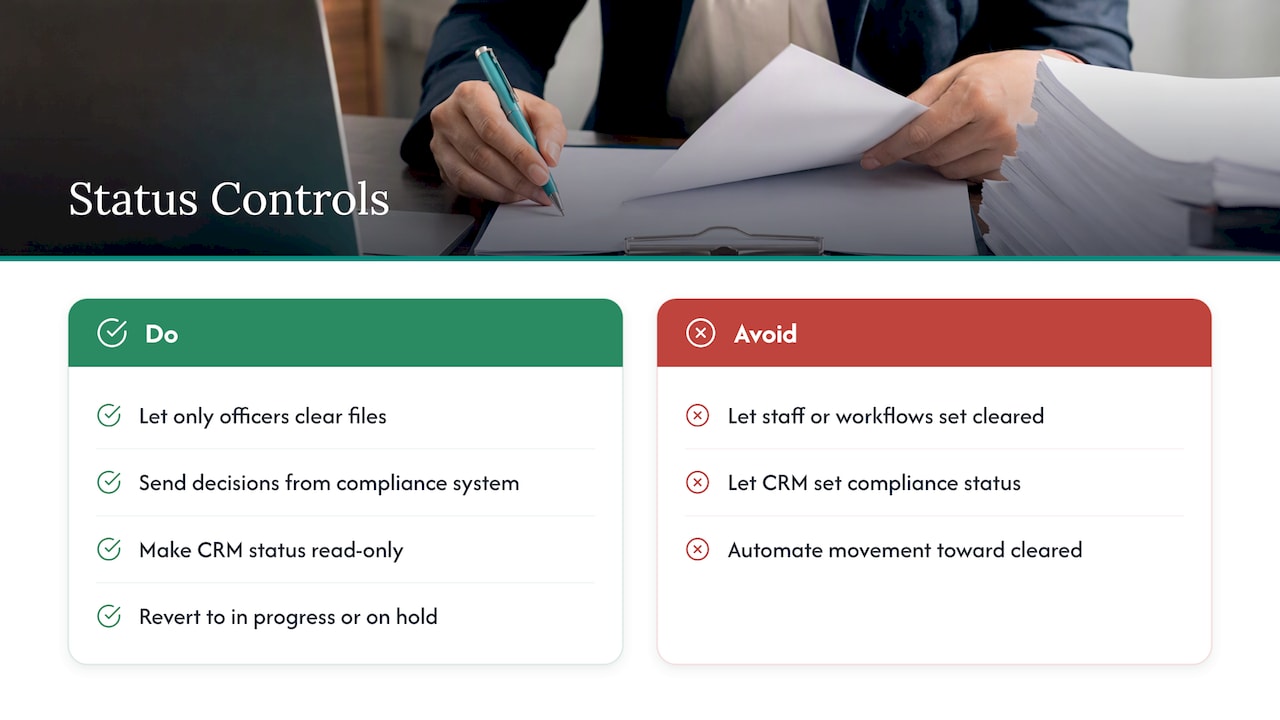
Only the officer moves a file to cleared. Cleared means a person with the right authority has reviewed the information and approved the file. If any salesperson, administrator or workflow rule can set that value, it stops being a compliance signal and becomes a convenience button. In the best set-up the CRM does not even have the option: the field is read-only for everyone, and the value arrives from the compliance system.
The CRM shows the result and never sets it. This is the cleanest design. The decision is made in the compliance system, recorded there with its reasons, and pushed to the CRM as a read-only indicator. If staff cannot type into the field, they cannot create a status that no one actually approved.
Automated movements go one way only. Systems may move a file from cleared back to in progress or on hold when something changes, such as a change in ownership or beneficial owners or a new screening result. They should never move a file towards cleared on their own. Automation can raise a hand. It cannot approve.
The reasoning is that your records have to show how a decision was reached. AUSTRAC’s overview of ongoing CDD says you must keep records of any decisions your business makes about how you conduct ongoing CDD on the customer. When a status changes, you should be able to show who authorised it, what they reviewed and why they decided as they did. A status set by anyone, for any reason, cannot be defended that way.
Why the decision and reasons live in the compliance system
Section 111 of the Act requires you to keep customer due diligence records for 7 years from the end of the business relationship, or from the completion of an occasional transaction. Those records must include any analysis, identification or assessment of ML/TF risk, or decision making, you undertook in relation to the customer. AUSTRAC’s record keeping overview describes record keeping as creating full and accurate records along with securely storing and managing them. Our note on the seven-year clocks explains how those periods run in practice.
A four-word status satisfies none of that. “Cleared” does not show how you verified identity, which sources you checked, how you rated the customer’s risk or who approved the file. If an AUSTRAC supervisor asks how you reached a decision on a specific customer, a screenshot of a CRM field is not an answer.
The compliance system should therefore hold, for each determination:
- the identity verification evidence and the date it was done
- screening results, including how each match was resolved
- the risk rating and the reasoning recorded behind it
- beneficial ownership findings, where the customer is a company or trust
- the name of the officer who approved the determination and the time of approval
- every later change, with who made it and why
The CRM then holds a single derived value. If the CRM is replaced, migrated or breached, the compliance record is not in it, and the CRM holds nothing that explains why a file has the status it has.
This separation also keeps your program honest. The program overview from AUSTRAC describes a risk-based program tailored to the nature, size and complexity of your business. A simple CRM flag cannot show that tailoring. A documented risk assessment, policies that follow from it and an action plan can. For how those documents should connect, see our guide to the AML risk assessment for real estate agencies.
Cleared is a snapshot, not a permanent badge
The word “cleared” invites a bad assumption: that the customer is approved for good. The Act does not work that way. Under the ongoing CDD provisions, which refer to sections 30, 32 and 39D of the Act, you must monitor customers to appropriately identify, assess, manage and mitigate the ML/TF risks you may face while providing designated services, and where you have a business relationship with a customer you must also review and, where appropriate, update your assessment of their ML/TF risk and their KYC information. AUSTRAC also sets out expectations on reviewing and updating customers’ ML/TF risk and KYC information.
That has three consequences for the status.
- Status should be able to move backwards. If a customer’s ownership structure or beneficial owners change, the customer becomes a politically exposed person or a re-screen returns a new result, the file should return to in progress or on hold, without any explanation visible in the CRM. AUSTRAC’s guidance adds that you do not need to collect and reverify an individual customer’s identity just because their identity document has expired, so expiry alone is not a reason to reopen a file.
- Show the date. A cleared status with the date of clearance helps staff see how current it is. It does not reveal anything about the reasoning.
- Treat each matter sensibly. A returning customer who is cleared for one transaction may need their risk looked at again for the next, for example when you are asked for a different kind of designated service, which AUSTRAC lists as a reason to review a customer’s ML/TF risk. Define in your policies when a clearance carries over and when it does not, and make the status follow that rule.
When a file moves back to on hold, staff should see only the neutral change. The compliance officer then contacts whoever needs to supply something, using wording that explains what is required without explaining why. AUSTRAC’s tipping off guidance suggests standardised communications and scripts for staff, and gives examples of genuine reasons that do not point to suspicion, such as needing to collect further information to meet your AML/CTF obligations or to keep customer details up to date.
What this looks like on a real file
Consider a residential sale handled by an agency. The vendor is a company, and the agent has just taken the listing.
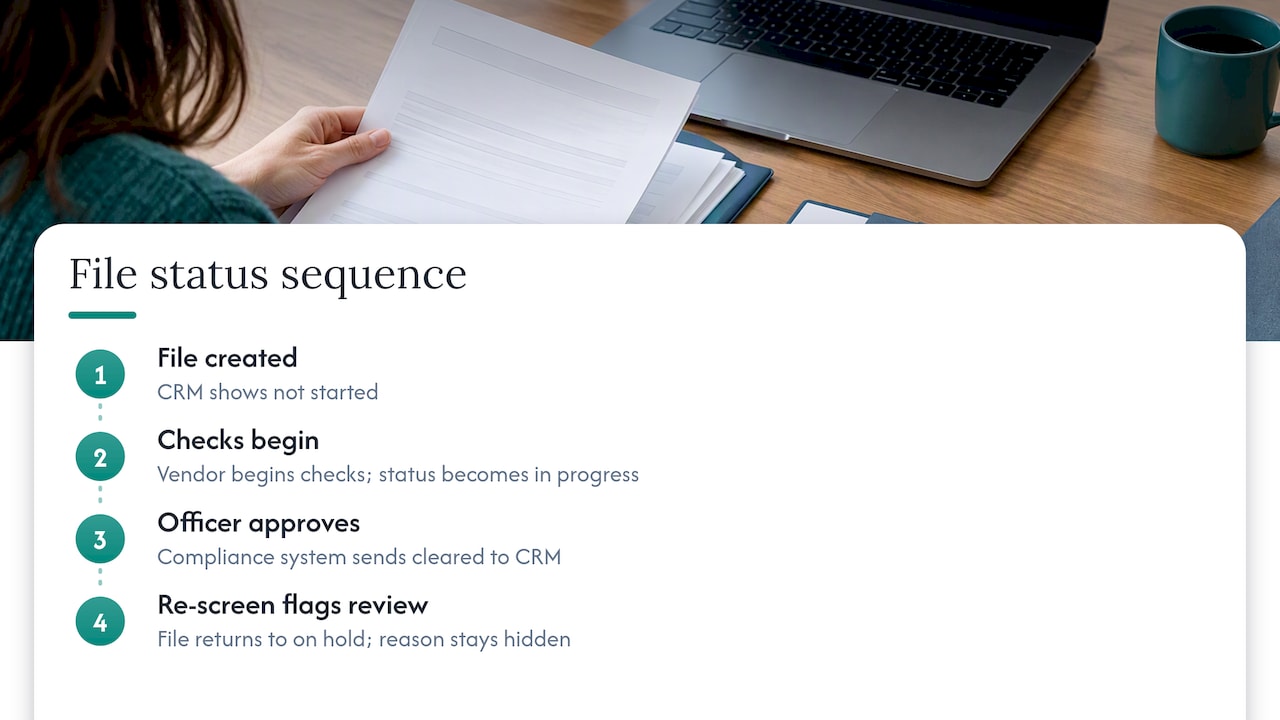
The moment the file is created, the CRM shows not started. The agent sends the vendor a secure link to complete identity checks. As soon as the vendor begins, the status changes to in progress. Behind the scenes, the compliance system verifies identity, resolves the company’s beneficial owners and screens the individuals involved.
The officer reviews the results and approves the determination. The compliance system pushes cleared to the CRM. The agent sees the green indicator and proceeds to the authority to sell.
A few weeks later, a re-screen flags something for review. The file quietly returns to on hold. The agent sees the change and calls the compliance officer, who says only that the file needs attention and asks the agent to pause any further work on that customer’s matter. The agent does not know whether the cause is a missing document, a name match or something else, and has no need to.
Nothing in that sequence required anyone in sales to know a reason. Nothing visible in the CRM could be read as suspicion. And every step is recorded in the compliance system with who did what and when.
If you are acting for parties in a purchase, the same logic applies to the other side of the table. Legal practices advising buyers on risk, such as this checklist on hidden risks in off-the-plan purchases, show how much sits behind a transaction that a simple status cannot capture, which is a good reason to keep the full picture in a controlled system.
Our view: the status is a signal, never a record
We built AML Guard for Australian Tranche 2 reporting entities, and the status question comes up in almost every conversation we have with agencies that use a CRM.
Our position is straightforward. The platform automates the lookups and the record keeping, not the judgement. An officer reviews each CDD outcome. REX receives status indicators only, never the underlying CDD data. The identity documents, liveness results, screening outcomes, beneficial ownership findings and risk reasoning stay in the compliance platform, and AML Guard’s tamper-evident audit trail holds records for 8 years, above the Act’s seven-year minimum.
We hold that design because it answers two different obligations at once. Section 111 asks you to keep records that show how you complied. Section 123 makes it an offence to disclose that a suspicious matter report has been or must be given, where that would or could reasonably be expected to prejudice an investigation. A CRM field can serve the second one well, but only if it is carefully limited, and it cannot serve the first one at all. Keeping the two functions apart is not extra work. It is the simplest way to meet both.
We also think agencies should be wary of any set-up where the status is editable by the people it governs. A flag that a salesperson can set to cleared is a flag a supervisor cannot trust.
Setting up your own status controls
Whether you use AML Guard or build your own process, work through these steps with your compliance officer.
- Fix the vocabulary. Adopt the four values and write them into your AML/CTF policies, so the status is part of your documented program.
- Remove everything else. Delete or hide custom stages, tags, icons and notes that carry compliance meaning.
- Make the field read-only. Allow values to arrive only from the compliance system or the officer.
- Define the triggers. Decide which events send a cleared file back to in progress or on hold, such as a change in ownership or beneficial owners, a new kind of service or a re-screening result.
- Audit the side doors. Check emails, exports, integrations and logs for any wording that implies a reason.
- Train the team. Staff should know what each status means, what to do when a file is on hold and why they must never speculate about reasons. Include the rule that questions go to the officer, not to the customer.
- Test with a sample file. Walk a dummy file through all four statuses and read every screen, message and log entry as a salesperson and as a customer would.
- Record the decision. Keep a short note in your program documents explaining the design and who approved it. That is evidence of a risk-based control.
Presenting the right information to the right people
Different roles need different views, and the status field is only the first layer.
| Role | Sees in the CRM | Sees in the compliance system |
|---|---|---|
| Sales staff and agents | One of four statuses, with the date | Nothing |
| Administrators | The same status | Nothing, unless also appointed to a compliance role |
| Compliance officer | The same status | Full determination, evidence, reasoning and audit trail |
| Principal or senior manager | The same status, plus governance reporting | Program-level reporting and approvals |
The principle is least privilege. The fewer people who see the detail, the smaller the chance it reaches a customer, and the easier it is to show you took reasonable precautions.
Where AML Guard fits
AML Guard runs customer due diligence end to end, from identity verification and screening to beneficial ownership determination and officer review, and then passes the neutral status to REX. Agents see where a file stands. The officer holds the reasoning. The audit trail records every change. If you want to see how that works for your agency, start at the AML Guard pricing page or the AML Guard home page.
FAQ
What is a compliance status?
A compliance status is a short label that shows where a customer’s AML/CTF checks stand, such as in progress or cleared. It signals whether work can proceed and nothing more. The evidence and reasoning behind it belong in your compliance records.
Can a CRM status replace my AML/CTF records?
No. Section 111 requires records that include the data you collected and any analysis, risk assessment or decision making for the customer, and AUSTRAC’s record keeping guidance says to store and manage records securely. A status field shows the outcome only, so it cannot meet that requirement on its own.
Should sales staff ever see why a file is on hold?
No. The reason may involve screening results or a suspicious matter assessment, and sharing it risks tipping off under section 123. Staff should see only that the file is on hold and who to contact. The officer deals with any request for information from the customer.
Who should be allowed to mark a file as cleared?
Only the AML/CTF compliance officer, or another person your program authorises in writing. The CRM should display the result and never set it. That keeps a clear line between the person who made the judgement and everyone who relies on it.
How long does a cleared status last?
Not indefinitely. Ongoing customer due diligence means the status is a snapshot, and changes in ownership or beneficial owners, in the services you provide or in screening results can send a file back to in progress or on hold. Your policies should say which events trigger that change.
Sources
- Anti-Money Laundering and Counter-Terrorism Financing Act 2006, Federal Register of Legislation
- Tipping off | AUSTRAC
- Your AML/CTF program overview | AUSTRAC
- Record keeping overview | AUSTRAC
- Overview of ongoing customer due diligence | AUSTRAC
- Reviewing and updating customers’ ML/TF risk and KYC information | AUSTRAC
Recommended
- Built-In CRM Compliance Sounds Convenient. Five Questions to Ask
- Three CRM AML Compliance Architectures Emerging Ahead of Tranche 2
- The Client Intake Portal: How Smart Agencies Onboard Clients for AML
See How AML Guard Works
Tranche 2 obligations are now in force.
Book a 20-minute demo to see how AML Guard supports your compliance from the moment your designated service begins.